Routing
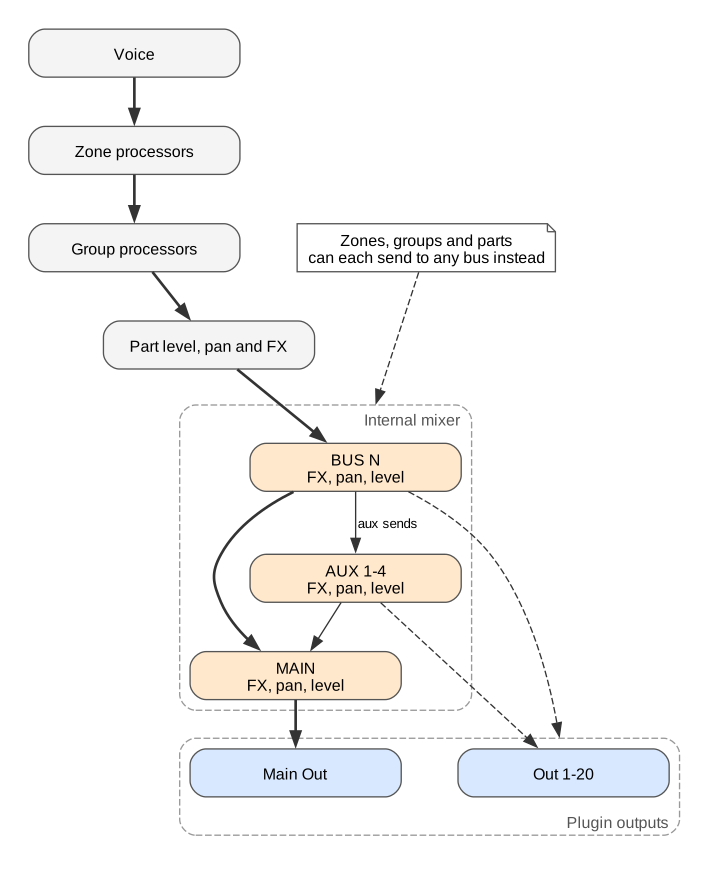
The default path
Section titled “The default path”- Each voice runs its zone’s processors.
- The voices of a group are summed and run the group’s processors.
- The groups of a part are summed, then the part’s level, pan and four FX are applied.
- The part plays into its own bus, BUS N, which runs its FX, pan and level.
- BUS N plays into MAIN, which plays out of Main Out.
Changing the path
Section titled “Changing the path”Zones, groups and parts each have an output setting. By default it sends audio on to the next level. It can instead send straight to Main, Bus 1 to Bus 16, or Aux 1 to Aux 4.
- Zone output, in the zone ROUTING pane. The default is Group Output. Choosing a bus skips the group and the part.
- Group output, in the group ROUTING pane. The default is Part Output. Choosing a bus skips the part’s level, pan and FX. The bus can belong to another part.
- Part output, the OUT button on the part card. The default is Part Default, the part’s own bus. Choosing a different bus moves where the part’s FX output goes.
Aux sends and plugin outputs
Section titled “Aux sends and plugin outputs”Each part bus has four aux sends, one to each aux bus, taken Pre-FX, Post-FX, Pre VCA or Post VCA. Aux buses play into MAIN.
Any part or aux bus can instead go to a plugin output, Out 1 to Out 20. A bus sent to a plugin output no longer plays into MAIN.